Your plan, billing & AI credits
What your plan includes, how billing works, and what AI credits are.
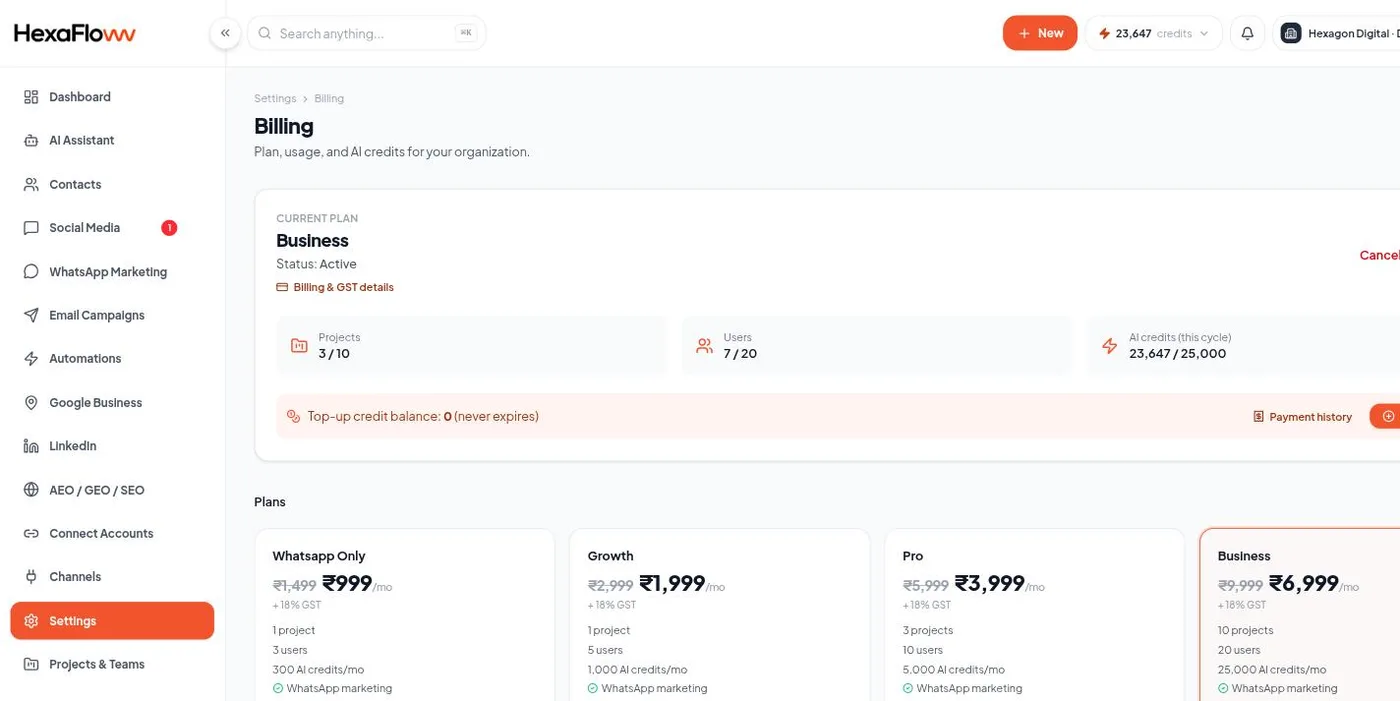
Your plan decides which features are available and how many AI credits you get each month. Everything billing-related is under Settings → Billing (/admin/settings/billing).
Plans and features
Plans differ mainly in which capabilities they unlock - for example email campaigns, the full social inbox and AI tools, Google Business Profile, and the Website AI module. If a feature isn't in your plan, its page shows an upgrade prompt instead of the normal controls, and channel cards in the Connect Accounts hub show as Locked.
Compare what each plan includes on the public features page.
How billing works
Subscriptions are billed on a recurring cycle. If a payment fails, you'll get email reminders and a banner in the app; if it stays unpaid, sending is eventually paused until the account is brought current. You can change plan or update payment details from the Billing page.
AI credits
AI credits are spent whenever HexaFloww does AI work for you - an AI reply suggestion, a buying-intent score on a conversation, an automatic handoff, knowledge extraction, and similar. Roughly, one AI action uses one credit.
Two kinds of credits
- Plan credits - included with your plan and reset at the start of each billing cycle. Unused plan credits don't roll over.
- Top-up credits - bought separately when you need more. They don't expire and carry across cycles. Plan credits are used first, then top-up credits.
Buying more
Click the credits chip in the top bar, or the top-up button on the Billing page, to open the top-up window. Pick a preset amount or enter your own, and pay. Credits are added immediately.
Running out When your balance reaches zero, AI features stop until the next cycle reset or a top-up. Nothing else about your account is affected - campaigns, the inbox, and automations that don't use AI keep working.