Connect TikTok
Link a TikTok account to handle its direct messages.
Connecting TikTok lets you handle TikTok direct messages from the same unified inbox as Facebook, Instagram, and WhatsApp.
TikTok support is in beta and covers direct messages only. TikTok's API does not support comment moderation for any third-party app, so there is no Comment Rules tab for TikTok.
Before you start
- You need the Admin or Manager role.
- You need a TikTok for Business account with access to the Business Account you want to connect.
- Your plan must include the social features.
Connect with TikTok (recommended)
If your HexaFloww instance has the TikTok connection configured, you'll see a Connect via OAuth button.
-
Open the TikTok connect page. Sidebar → Connect Accounts → TikTok, or go to
/admin/connect-accounts/tiktok. -
Start the OAuth flow. Click the connect button. You're redirected to TikTok for Business to grant permissions.
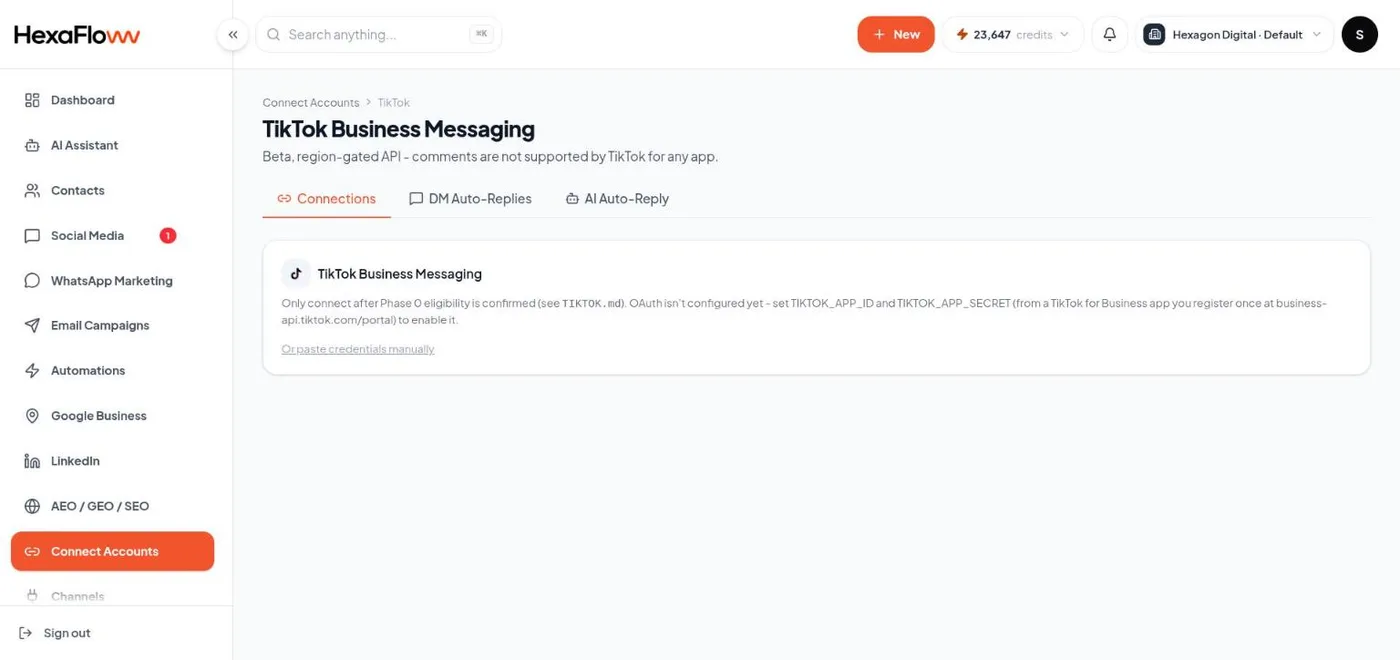
TikTok connect page with the Connect via OAuth button -
Grant access and pick a Business Account. Approve the permissions, then choose which TikTok Business Account to add. You return to HexaFloww and the account appears in the connected list.
Connect manually (fallback)
If OAuth isn't configured, or it fails, expand Advanced: paste credentials manually and enter the account ID and access token from your TikTok for Business app. When OAuth was used but only the account ID is missing, HexaFloww asks you to confirm just that one value.
Common problems
- No connect button at all - the TikTok connection isn't configured on your instance yet. Contact support; only manual credential entry is available until then.
- Messages not arriving - the connected account doesn't have messaging enabled, or the permissions were declined. Disconnect and reconnect, approving everything.
Next steps