How automations work
Triggers, steps, and enrollments in plain terms.
An automation is a journey that runs for a contact on its own - something happens (a trigger), and HexaFloww runs a series of steps for that contact.
The three ideas
- Trigger - the event that starts the journey. For example "opened a campaign", "joined a segment", "sent a WhatsApp message", "opted in to WhatsApp".
- Steps - what happens next, in order: wait, send an email, send a WhatsApp template, add or remove from a segment, or branch on a condition.
- Enrollment - one contact's run through the journey. Many contacts can be enrolled at once, each at their own point in the steps.
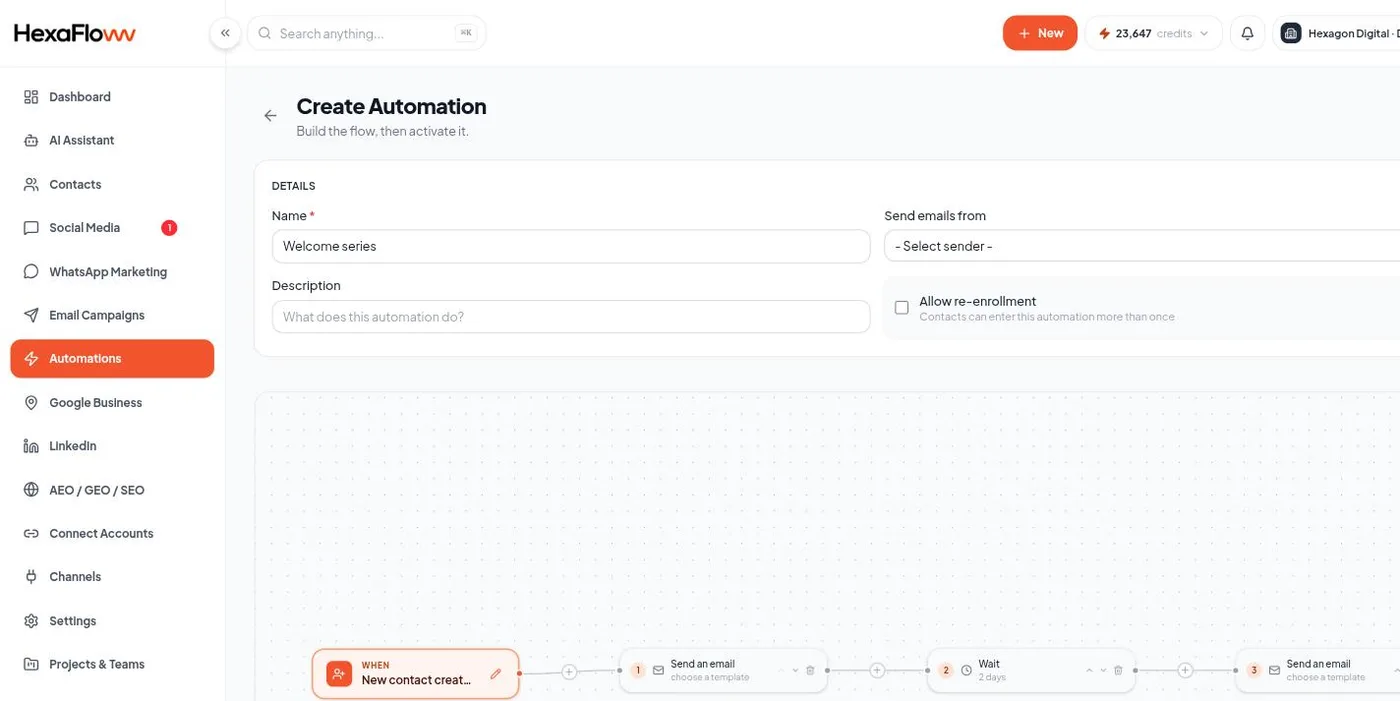
Building one
- Open Automations → New Automation. Go to
/admin/automations. - Choose a trigger and configure it.
- Add steps on the canvas and set each one up.
- Activate. New matching events now enroll contacts.
See Build your first journey for a worked example, and Triggers & steps for the full list.
Status
- Draft - created but never activated. It does nothing yet.
- Active - running and enrolling.
- Completed - it finished its current work (no one is enrolled right now). It flips back to Active automatically when a new event matches.
- Paused - you stopped it (the Pause button); it won't enroll anyone until you activate it again.
Consent and frequency rules still apply inside automations. A WhatsApp step won't message a contact who hasn't opted in or who is frequency-capped.