Custom webhooks
Send contacts in from any system that can post JSON.
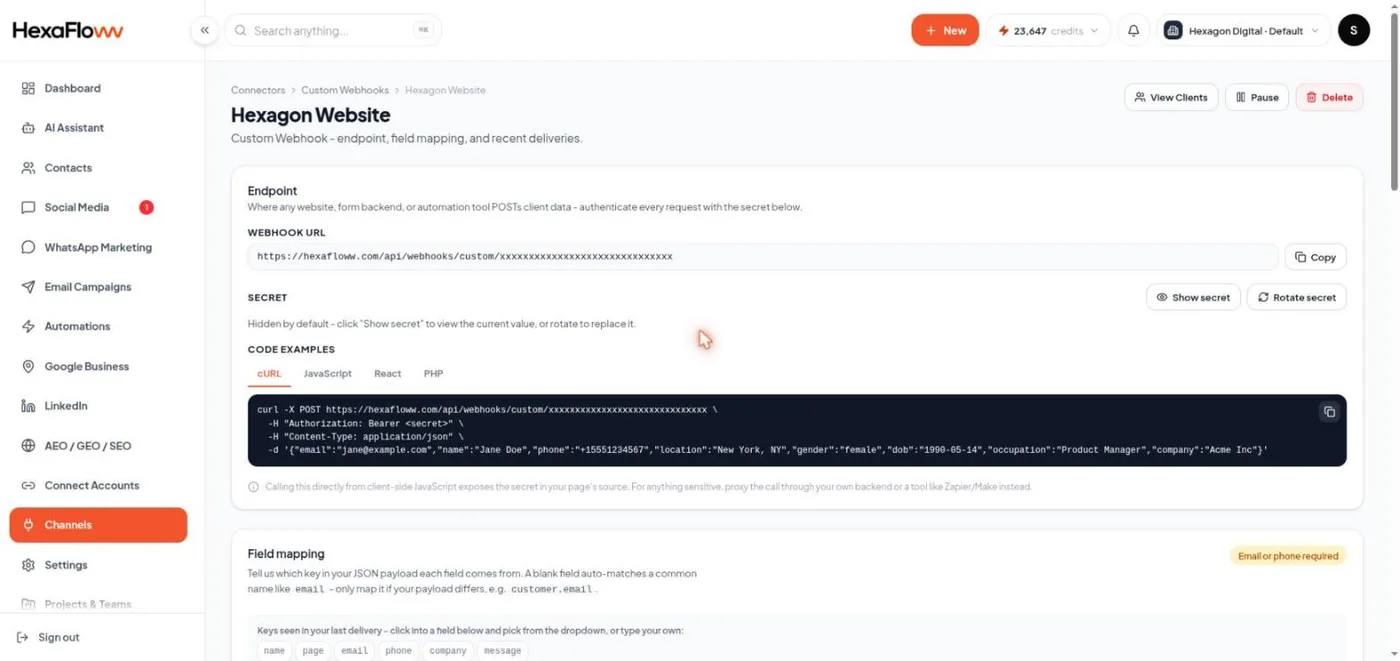
If your source isn't one of the built-in connectors, a custom webhook lets any system that can send an HTTP request add contacts to HexaFloww.
Set one up
- Open Connectors → Custom Webhooks → Add Webhook. Go to
/admin/connectors/custom-webhooks. - Name it and click Create webhook. HexaFloww gives you a unique URL and a secret (the secret is shown only once).
- Configure the sending system to POST JSON to that URL with the secret as an
Authorization: Bearer <secret>header. - Map fields on the webhook's detail page - tell HexaFloww which JSON keys are email, name, phone, and so on, and whether to keep unmapped keys as custom fields.
What to send
A JSON object per contact, with the secret in the Authorization header:
POST <your webhook URL>
Authorization: Bearer <secret>
Content-Type: application/json

{
  "email": "[email protected]",
  "name": "Sam Lee",
  "phone": "+919876543210",
  "source": "partner-site"
}
Each delivery is logged with the result. You can see recent contacts added by this webhook from its detail page.
Common problems
- 401 / rejected - the secret is missing or wrong.
- Contact not created - no email key, or the email key name doesn't match your field mapping.
- Nothing in the log - the request isn't reaching the URL; check it in the sending system.