Consent, opt-in & the suppression list
How opt-outs work and how to keep your sending compliant.
HexaFloww tracks consent per channel and keeps a global do-not-send list so an opt-out on one channel is honoured everywhere in that project.
Consent per channel
- Email - anyone with an email address can be emailed unless they've unsubscribed or hard-bounced.
- WhatsApp - a contact must explicitly opt in before you can send them a marketing template. See WhatsApp audience & consent.
The suppression list
/admin/suppression is the global do-not-send registry for the project. It covers both channels in one list - WhatsApp entries carry a WhatsApp badge, and you can filter by the reason an entry was added. A contact on it is excluded from every send on that channel, always.
It fills up automatically from:
- email unsubscribes (via the unsubscribe link);
- hard email bounces;
- WhatsApp STOP replies.
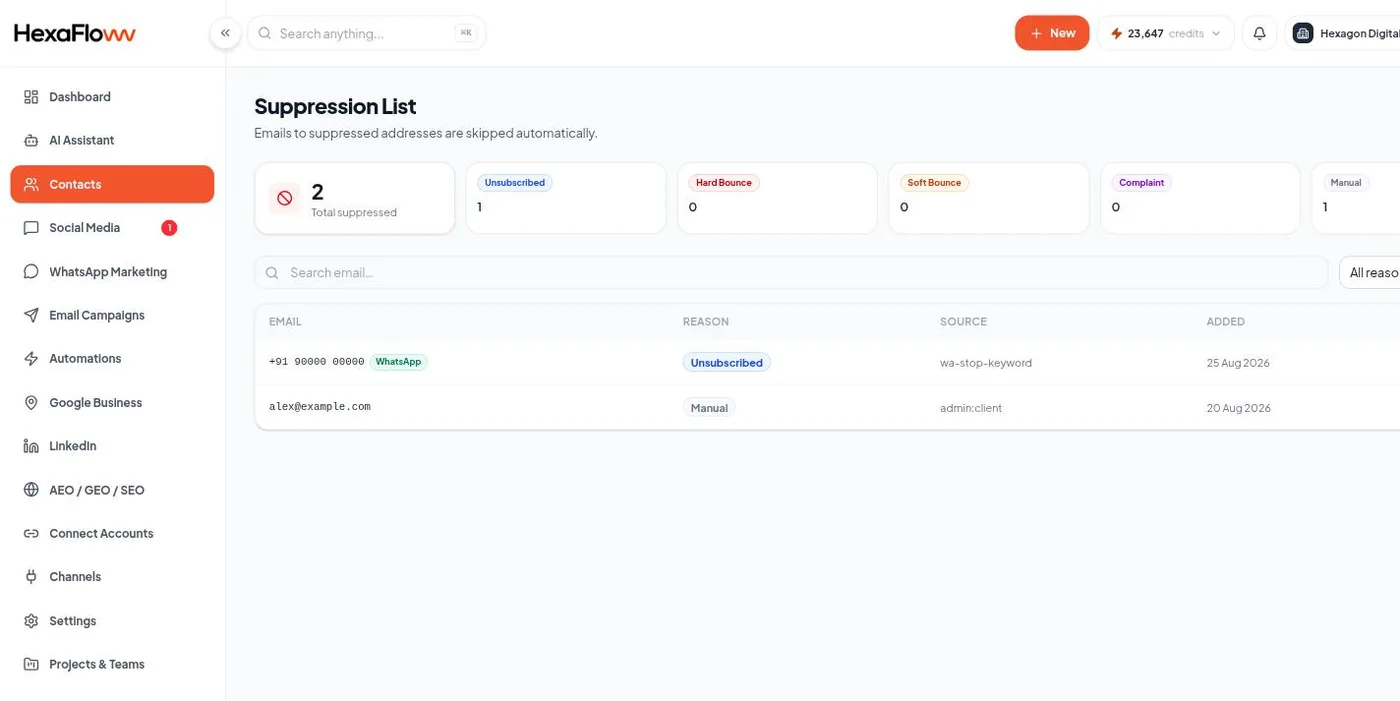
You can also add entries by hand with Add to list, or remove one from its row - for example to honour an opt-out request that came in by phone.
Removing someone from the suppression list re-enables sending to them. Only do this with a clear record that they asked to be re-subscribed.
Keeping compliant
- Only import and message people who agreed to hear from you.
- Every marketing email needs a working unsubscribe link - see Unsubscribe links & staying compliant.
- Respect WhatsApp frequency limits (they're on by default).