The setup checklist
The guided "Get set up" card on your dashboard and what each step does.
New projects show a "Get set up" card at the top of the dashboard. It walks you through the few things needed before you can send your first campaign.
The steps
Depending on your plan, the checklist includes:
- Connect email sending - add an SMTP or Amazon SES account so email campaigns can go out. (Skipped on WhatsApp-only plans.) See Set up email sending.
- Import your contacts - bring in the people you want to market to. See Import contacts from a CSV.
- Connect WhatsApp or social - link at least one channel. See The Connect Accounts hub.
- Send your first campaign - an email campaign, or the WhatsApp campaign wizard on WhatsApp-only plans.
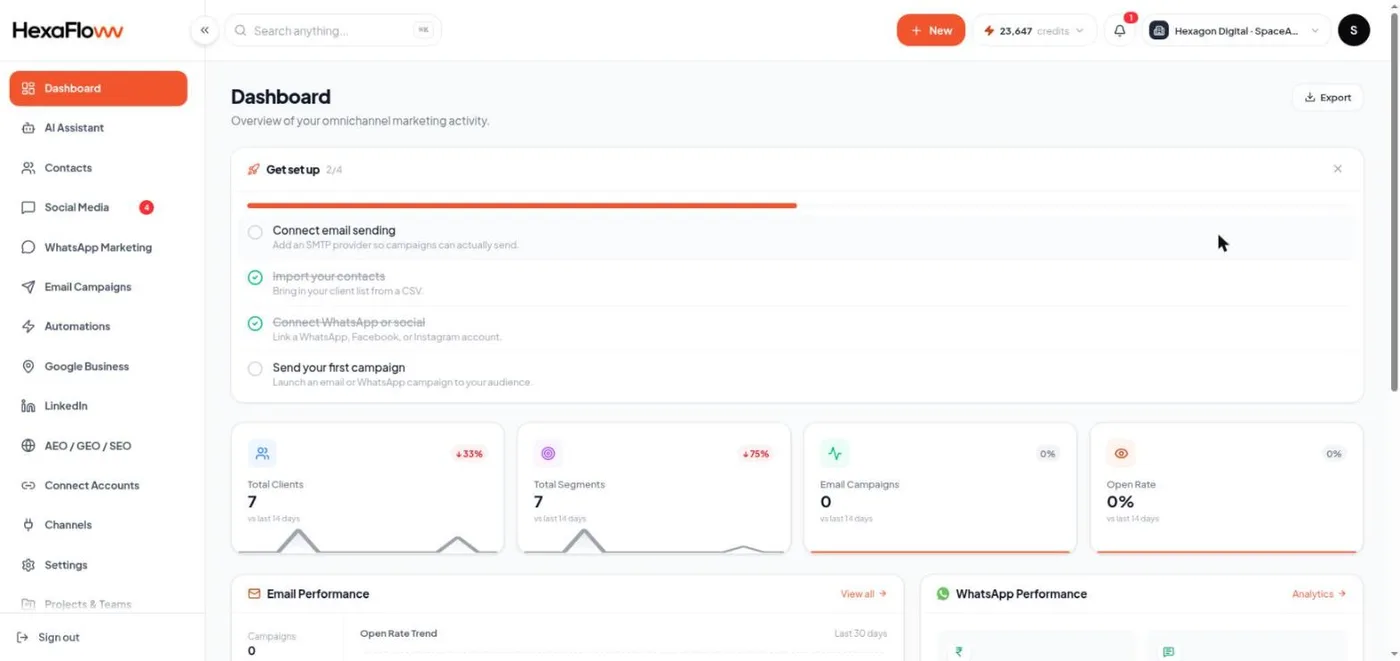
It stays accurate automatically Each step is checked live against your actual data every time the dashboard loads - there's no separate progress that can get out of sync. Connect SMTP and the email step ticks itself; send a campaign and that step completes.
Hiding and resuming it
You can dismiss the card while it's incomplete. It's replaced by a small "Resume setup" link with your progress, so you can always get back to it. Once every applicable step is genuinely done, the card disappears for good.