Segments - fixed lists vs. smart rules
Group contacts manually or with rules that update automatically.
A segment is a group of contacts you can target with a campaign or an automation. There are two kinds.
Manual vs. dynamic
- Manual - you hand-pick the members. The list only changes when you add or remove someone.
- Dynamic - you define rules, and HexaFloww keeps the membership up to date automatically. For example "opened a campaign in the last 30 days" or "company contains Acme".
Create a segment
-
Open Segments → New Segment. Go to
/admin/segments. -
Step 1 · Basic Details. Name the segment and add an optional description.
-
Step 2 · Segment Type. Choose Manual (hand-pick members) or Dynamic (auto-computed from rules).
-
Step 3 · Members or Rules.
- Manual: search and add contacts.
- Dynamic: build a rule tree - combine conditions with AND / OR and group them.
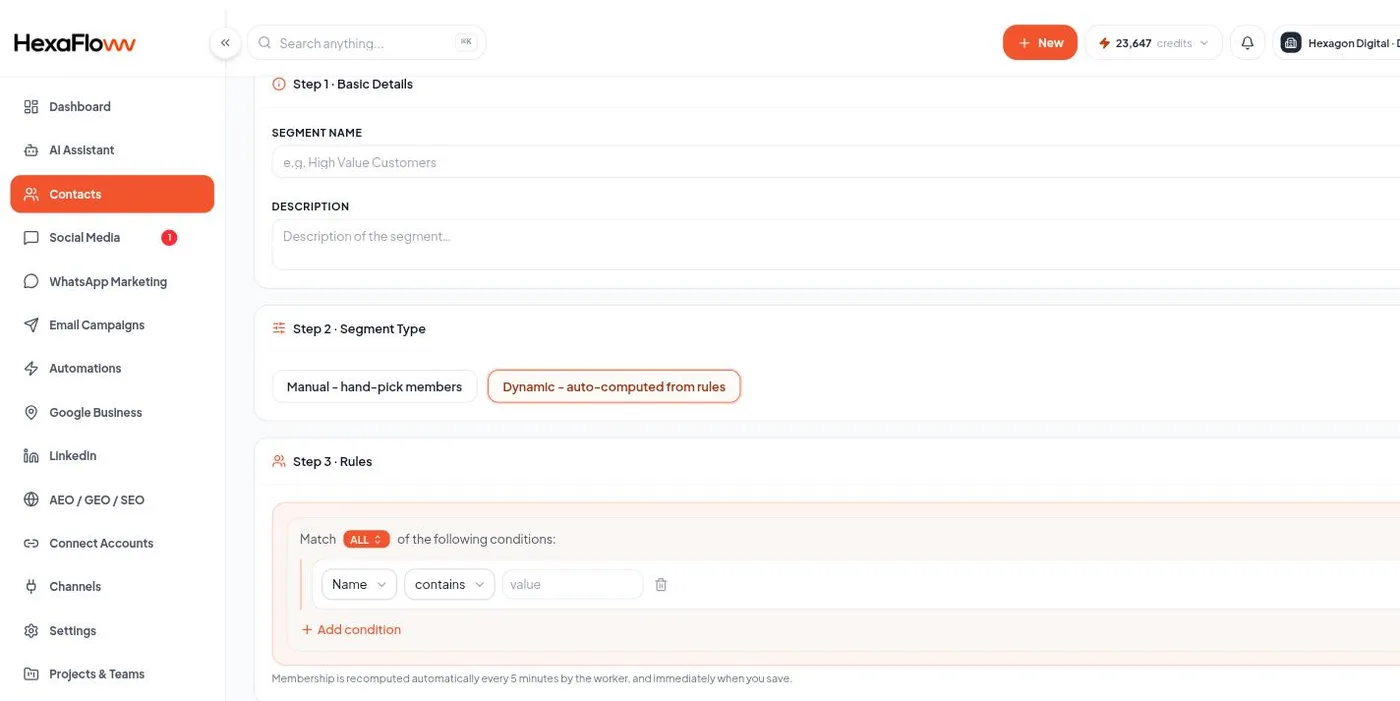
Segment rule builder with grouped conditions -
Create Segment.
What you can build rules on
- Standard fields (email, name, company, phone, location, occupation, gender, date of birth, created date) and any custom field.
- WhatsApp opt-in status; whether they've opened / clicked / unsubscribed from any email; membership in another segment.
- Behavior: opened or clicked a specific campaign; last activity within N days.
- Open-timing fields for Smart Send (opens-at-hour, instant opener, average time to open, open rate).
Dynamic segments are recomputed on a schedule (about every 5 minutes), not instantly. A contact who just met the rules may take a few minutes to appear.