Your first login & dashboard tour
What you see when you sign in, and where everything lives.
Here's what to expect the first time you sign in, and a quick tour of where everything lives.
Signing in
- Go to the login page and enter your email and password. Use the credentials from your welcome email. If you don't have a password yet, use Forgot password to set one.
- Pick a workspace if asked. If your account has more than one organization or project, you'll choose one now. Otherwise you go straight to the dashboard. See How HexaFloww is organized.
The dashboard
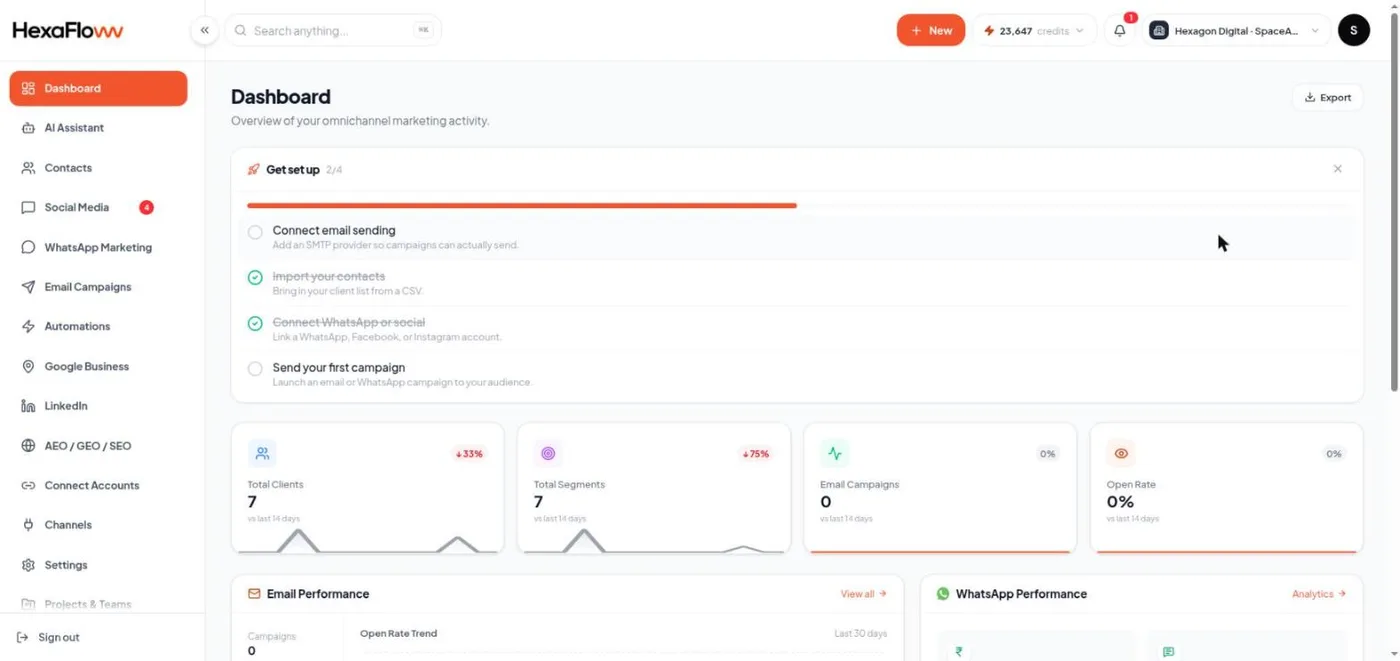
The dashboard (/admin) is your home screen. For a new project it shows a "Get set up" checklist at the top - follow it to connect a channel and send your first campaign. See The setup checklist.
Finding your way around
- Left sidebar - every module, grouped: Contacts, Connect Accounts, Email, WhatsApp, Social Inbox, Automations, and more. Hover a group to see its pages.
- Top bar - the workspace switcher (your organization and project name), the AI credits chip, the notifications bell, and your account menu.
- Settings - at the bottom of the sidebar: email sending, AI provider, team, projects, API keys, and billing.
If a page says you don't have access Your role controls what you can see and do. Ask an organization admin to adjust it - see Invite teammates & user roles.