How HexaFloww is organized
Organizations, projects (workspaces), and how your data is kept separate.
HexaFloww has two levels that matter to you day to day: your organization and one or more projects. Understanding the difference explains where your data lives and why you sometimes pick a workspace after logging in.
Organization
Your organization is your company account. It holds your team members and your billing. It doesn't hold marketing data directly - that lives in projects.
Project (your workspace)
A project - also called a workspace or brand - is where all the actual work happens. Contacts, segments, templates, campaigns, the social inbox, connected accounts, and automations are all scoped to a single project.
Every organization automatically gets one default project. Most businesses only ever need that one. Agencies and companies with several brands can create more, and each project's data is kept completely separate from the others.
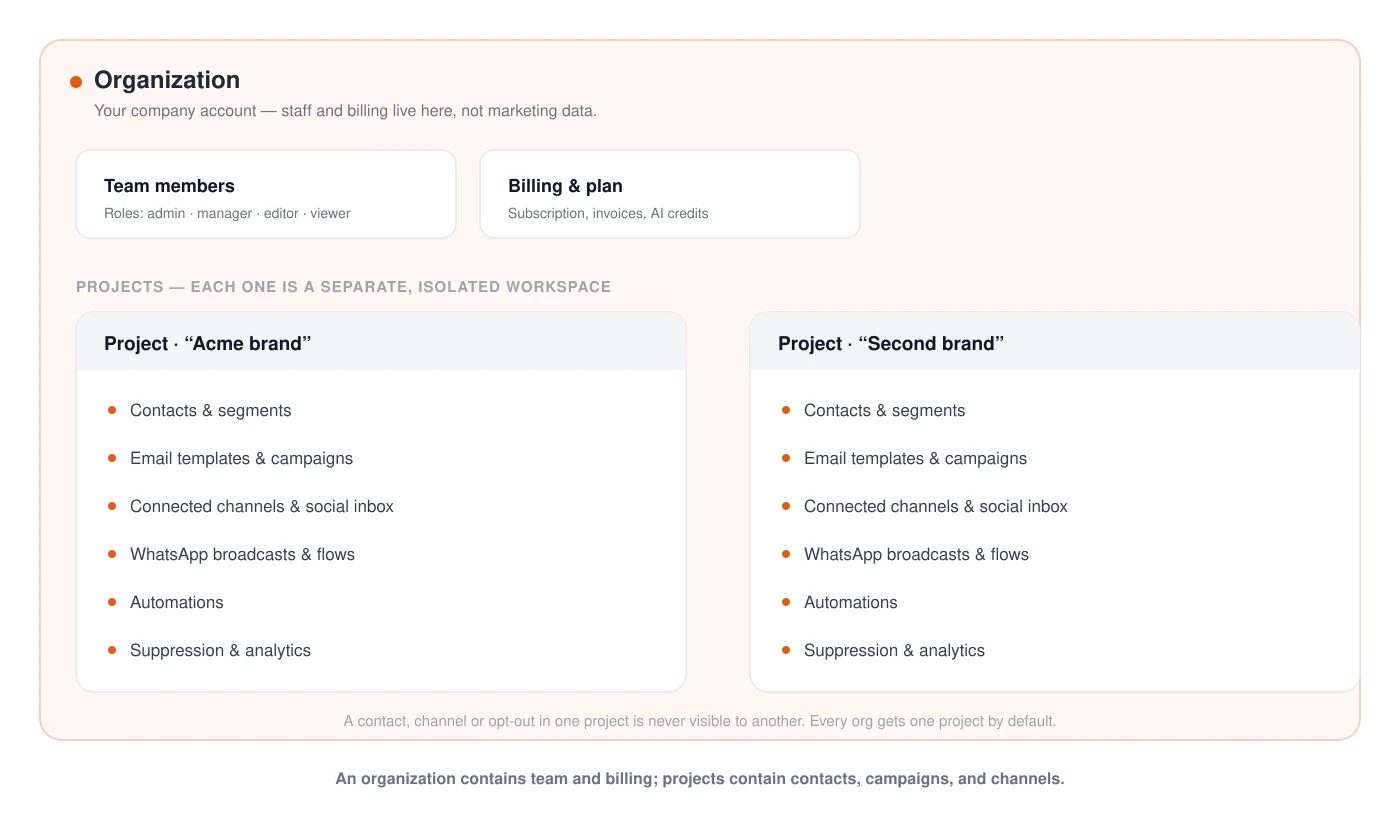
What "scoped to a project" means A contact you import into Project A is not visible in Project B. A WhatsApp number connected to Project A can't be used by Project B. Opt-outs, suppression, and analytics are all per-project too.
Why you sometimes choose a workspace after login
If your account belongs to more than one organization, or your organization has more than one project, HexaFloww asks you to pick which one to work in right after you sign in. If you only have one of each, you go straight to the dashboard. You can switch at any time - see Switching workspace.